Optioneer comparison

Optioneer vs Excel: options workflow or custom spreadsheet?

Excel gives you a flexible canvas for formulas and reports. Optioneer provides an options-aware structure for positions, P/L, Greeks, portfolio scenarios, discovery, and ongoing management.

Card required. Broker Sync requires active paid Premium and is not available during the trial. Set up positions with manual or supported CSV import or review the tested IBKR Broker Sync requirements.

Competitor information last checked:

Quick decision

Which product fits your main job?

Start with the outcome you need most. These tools overlap, but they are not organized around the same problem.

Choose Optioneer

Choose Optioneer if you want to start with an options-specific portfolio model and spend less time maintaining schemas, formulas, and position-grouping rules.

Choose Excel

Choose Excel if you want complete control over calculations and presentation, already maintain reliable data inputs, and are comfortable owning the workbook logic.

Feature comparison

What each tool helps you do

Source icons open the official competitor page supporting each claim.

Primary job

Optioneer

Options portfolio workflow

Track positions, P/L, Greeks, activity, scenarios, and supported management workflows in a purpose-built model.

Excel

General spreadsheet

Build a custom calculation, table, chart, or tracking model around your own schema.

Portfolio structure

Optioneer

Built in

Positions, transactions, strategies, cash, and portfolio-level results use an options-aware data model.

Excel

User designed

You choose the workbook structure and maintain the formulas and conventions it relies on.

Market data

Optioneer

Options workflow data

Use available stock and option-chain data in portfolio views, Discovery, Scenario Lab, and Roll Assistant.

Excel

Refreshable linked data

Excel documents linked Stocks data for equities, funds, indexes, currencies, commodities, and related fields; an options-specific workbook still needs its own data design.

Options calculations

Optioneer

Built-in payoff and Greeks

Use the Options Calculator and available position or portfolio Greeks without maintaining workbook formulas.

Excel

Custom formulas

Excel can calculate and analyze formulas, but an options pricing or Greeks model is something the workbook author defines and validates.

Multi-leg positions

Optioneer

Strategy-aware tracking

Supported strategies keep related legs and activity inside the portfolio workflow.

Excel

Custom grouping

A spreadsheet can represent multi-leg positions, but the workbook author decides how legs and adjustments are grouped.

Cross-device access

Optioneer

Web, iOS, and Android

Use the same portfolio workflow across the web and Optioneer mobile apps.

Excel

Web and mobile available

Microsoft lists a free web experience that also works on iOS and Android; paid plans can add desktop apps.

Workflow comparison

Maintained product workflow or workbook you control

The tradeoff is not whether a spreadsheet can represent options data. It is who defines, validates, and maintains the structure over time.
1

Optioneer

Set up the model

Add positions manually, import supported CSV activity, or use eligible read-only Broker Sync after the trial.

Excel

Set up the model

Create or adapt worksheets, formulas, tables, and formatting for the fields and calculations you need.

2

Optioneer

Refresh information

Use the application workflow to update positions and request supported market data where it is available.

Excel

Refresh information

Refresh supported linked data or maintain another import and update process for information outside those linked types.

3

Optioneer

Review and evolve

Use portfolio P/L, Greeks, Your Edge, Scenario Lab, and eligible roll comparisons inside the same product model.

Excel

Review and evolve

Extend the workbook with additional formulas, analysis, charts, and shared views as your process changes.

Optioneer product example

See the maintained portfolio model

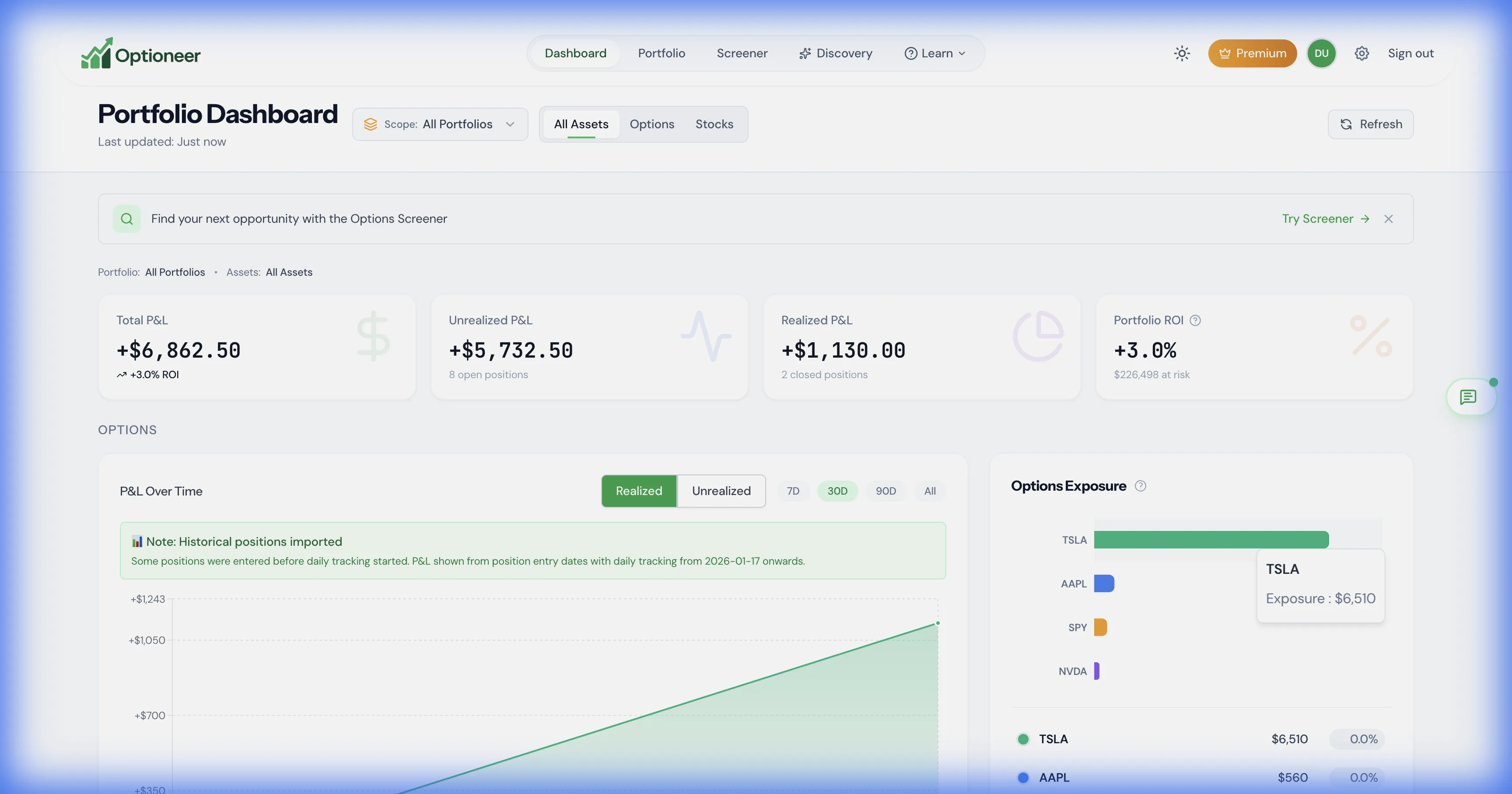
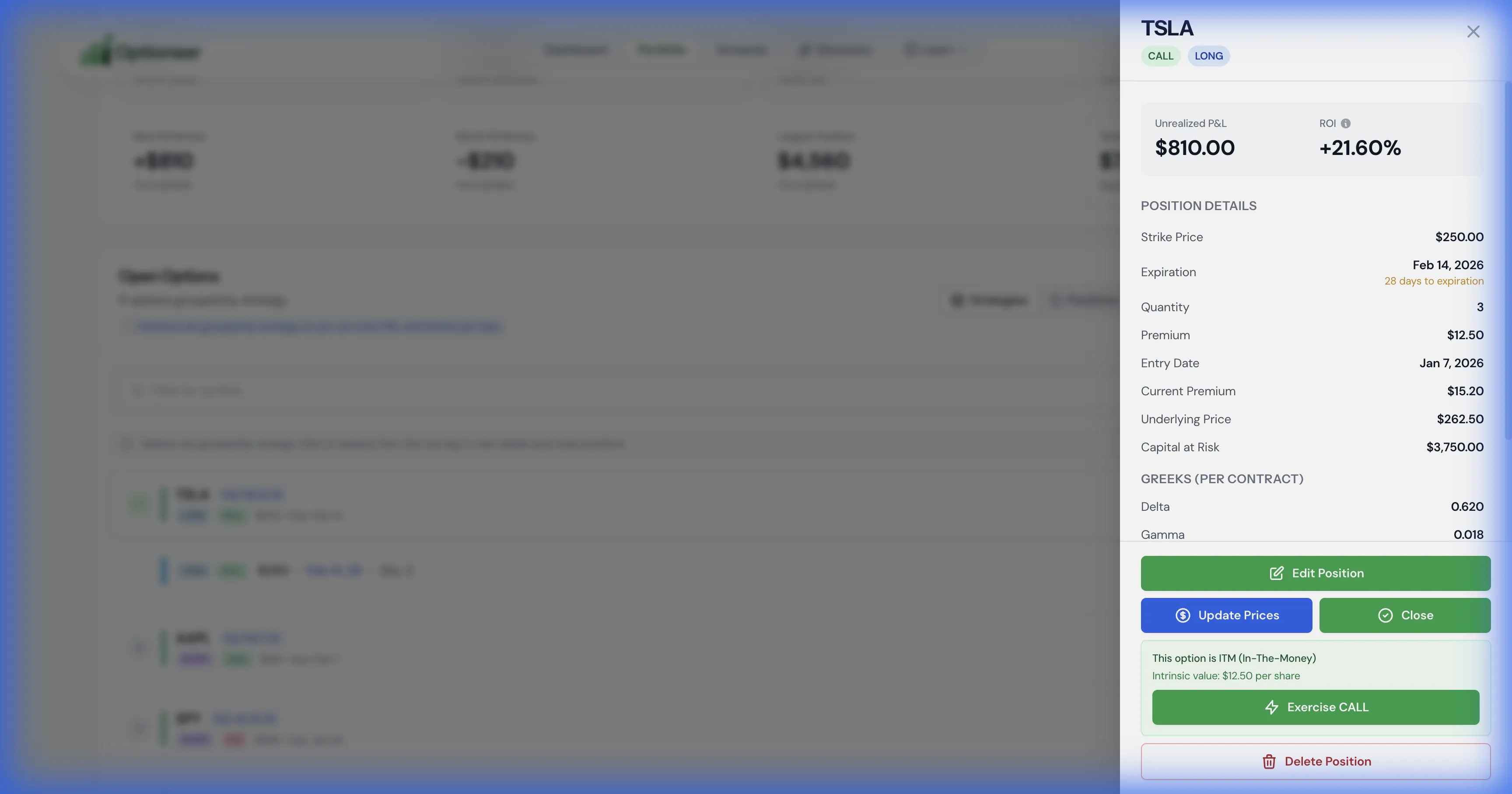
These safe demo captures show the structured Optioneer side of the comparison: a portfolio overview and position-level risk context without a custom workbook.
Optioneer demo portfolio dashboard with positions, profit and loss, and exposure
A shared portfolio model connects positions, activity, P/L, and available risk measures. Illustrative demo data.
Optioneer demo position view with profit and loss and Greek estimates
Position context is part of the application rather than a set of workbook formulas you maintain. Illustrative demo data.

Product strengths

Where the products differ

Excel is a general-purpose spreadsheet for formulas, analysis, visualization, sharing, and collaboration rather than a dedicated options portfolio tracker.

Where Excel stands out

  • Excel is more flexible when a trader needs a highly specific model, calculation, report, or presentation that a purpose-built product does not expose.
  • The free web edition lowers the entry cost for a trader who is prepared to build and maintain the workbook.

Pricing comparison

Compare the subscription and what it is for

Prices are snapshots from the linked official pricing pages. Taxes, promotions, market-data rules, app-store pricing, and plan details can change.

Optioneer Premium

US$19/month or US$150/year

  • Monthly plan: US$19, billed monthly
  • Annual plan: US$150, paid annually (US$12.50/month equivalent)
  • 7-day Premium trial; payment card required
  • Broker Sync is not available during the trial and requires active paid Premium
View Optioneer pricing

Excel

Free web edition; paid Microsoft 365 plans are also available

  • Microsoft lists Excel for the web at no charge for one person
  • The US page lists Microsoft 365 Personal at US$9.99 monthly or US$99.99 yearly
  • Plan contents and prices can vary by market and billing choice
View official Excel pricing

Excel has a free web option and is the more flexible blank canvas. Optioneer pricing covers a maintained, options-specific portfolio workflow rather than a general spreadsheet suite.

Frequently asked questions

Questions about Optioneer and Excel

Can Excel track an options portfolio?+

Yes. A workbook can represent positions, transactions, calculations, and charts. You are responsible for the schema, formulas, data inputs, grouping rules, and ongoing validation.

Does Excel include automatic options-chain data?+

Microsoft documents linked financial data types for instruments such as equities, funds, indexes, currencies, and commodities. That documentation does not establish a built-in options-chain portfolio workflow, so an options workbook may need another data source or import process.

Is Excel cheaper than Optioneer?+

Excel for the web is listed as free. Paid Microsoft 365 plans add desktop apps and other services. The practical tradeoff also includes the time and expertise required to create and maintain an options workbook.

Can I keep Excel alongside Optioneer?+

Yes. Excel can remain useful for custom analysis or reporting while Optioneer handles the structured portfolio workflow. No automatic round-trip integration is implied.

Official competitor sources

We use first-party product and pricing pages and date the review so claims can be rechecked.

Competitor information last checked:

Try the Optioneer workflow

Use an options portfolio model you do not have to build

Track positions, inspect exposure, test hypothetical portfolio changes, and manage recurring options workflows without maintaining a custom workbook.

Back to all comparisons