Optioneer comparison

Optioneer vs Option Samurai: scanner depth or portfolio context?

Option Samurai combines a broad scanner with trade analysis, journaling, live position monitoring, and a supported broker handoff. Optioneer connects a smaller Discovery workflow to selected-portfolio scenarios, P/L, Greeks, Your Edge, and Roll Assistant.

Card required. Broker Sync requires active paid Premium and is not available during the trial. Set up positions with manual or supported CSV import or review the tested IBKR Broker Sync requirements.

Competitor information last checked:

Quick decision

Which product fits your main job?

Start with the outcome you need most. These tools overlap, but they are not organized around the same problem.

Choose Optioneer

Choose Optioneer if you want practical options screening with Saved Screens, followed by portfolio-aware Scenario Lab testing and ongoing position analytics.

Choose Option Samurai

Choose Option Samurai if you want market-wide scanning, many configurable filters, a scanner-to-journal flow, live monitoring, and its documented Tradier or Thinkorswim handoff.

Feature comparison

What each tool helps you do

Source icons open the official competitor page supporting each claim.

Primary job

Optioneer

Portfolio-centered workflow

Move from Discovery into portfolio testing, tracking, and management.

Option Samurai

Market-wide options scanning

Search large options and stock universes using strategy-specific filters.

Reusable screens

Optioneer

Saved Screens

Premium members can save, rename, duplicate, update, and rerun up to 50 Discovery screens.

Option Samurai

Saved and predefined scans

Save custom scans or begin with pre-built scan templates.

Filter depth

Optioneer

Practical strategy filters

Filter supported scans by contract, expiration, liquidity, return, and other criteria.

Option Samurai

More than 100 filters

The feature page lists fundamentals, strategy, volatility, and technical filters.

Portfolio impact test

Optioneer

Scenario Lab

Estimate how a hypothetical stock or options trade changes cash, concentration, and Greeks.

Option Samurai

Trade-level scenario analysis

Adjust expiration, price range, and implied volatility to update an individual trade P/L profile.

Ongoing positions

Optioneer

P/L, Greeks, Broker Sync

Track positions and portfolio exposure; eligible paid accounts can use read-only Broker Sync.

Option Samurai

Journal + live monitoring

Send a scan result to the journal, monitor open positions, and review portfolio and trade performance.

Broker handoff / order preparation

Optioneer

Manual IBKR preparation

Eligible single-leg scenarios can create manual instructions or a BasketTrader CSV. You review and transmit the order in IBKR TWS; Optioneer never submits it.

Option Samurai

Tradier or Thinkorswim handoff

Its documented order-entry handoff prepares a trade for Tradier or Thinkorswim and still requires user confirmation.

Payoff calculator

Optioneer

Public Options Calculator

Model single-option and multi-leg payoff, break-even, and P/L.

Option Samurai

P/L visualization

Visualize projected profit and loss and update the profile with scenario controls.

Workflow comparison

What happens after a scan finds a candidate?

Both products carry a scan beyond the result. The key difference is trade-level analysis and journaling versus testing the idea against the selected portfolio.
1

Optioneer

Define the search

Choose a supported Discovery scan, apply practical filters, and save the screen for reuse.

Option Samurai

Define the search

Choose from predefined scans or combine a large filter library into a custom strategy scan.

2

Optioneer

Analyze a candidate

Open the payoff in the Options Calculator or send the idea into Scenario Lab to estimate portfolio impact.

Option Samurai

Analyze a candidate

Use research and scenario controls to inspect the P/L profile as price, time, and volatility change.

3

Optioneer

Track what happened

Add or sync the position, watch portfolio P/L and Greeks, and later review realized evidence in Your Edge.

Option Samurai

Track what happened

Send the result to the journal, monitor the live position, or prepare an order for a documented supported broker with manual confirmation.

Optioneer product example

See how an Optioneer candidate gains portfolio context

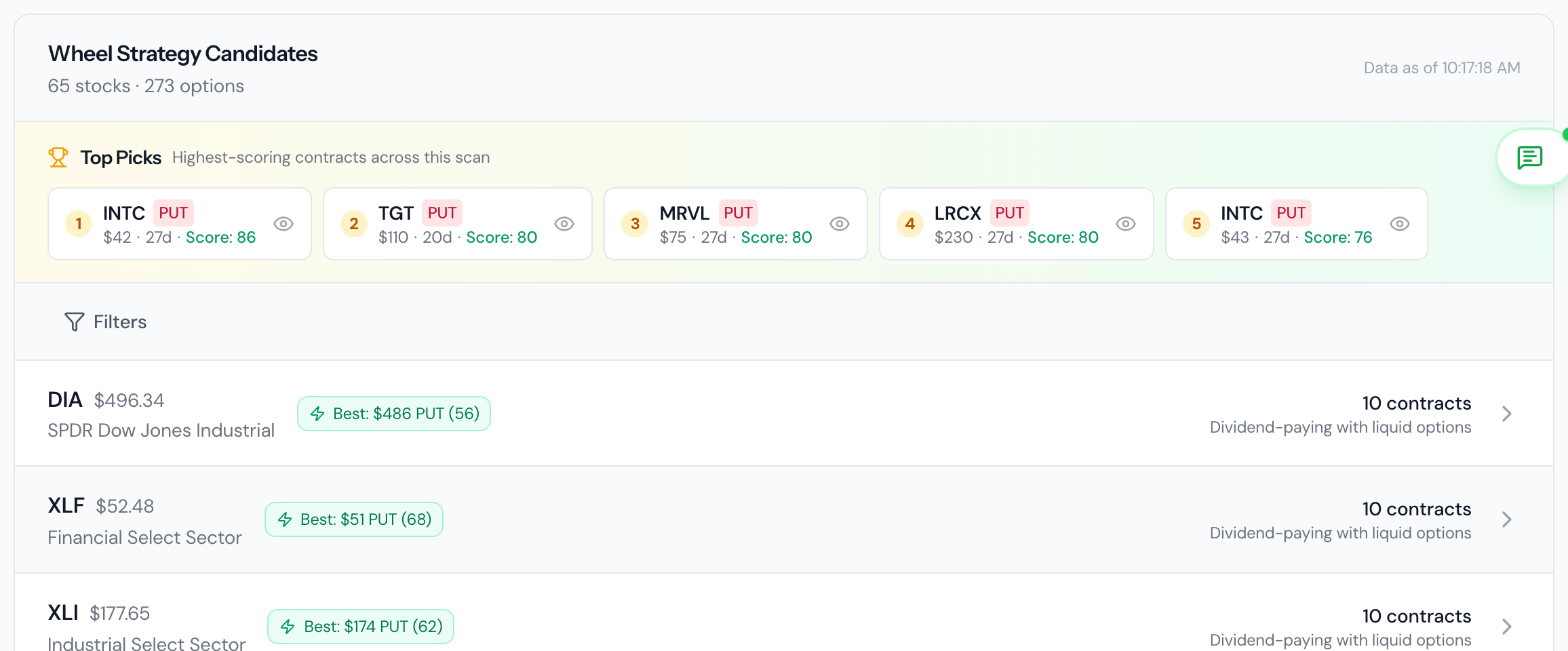
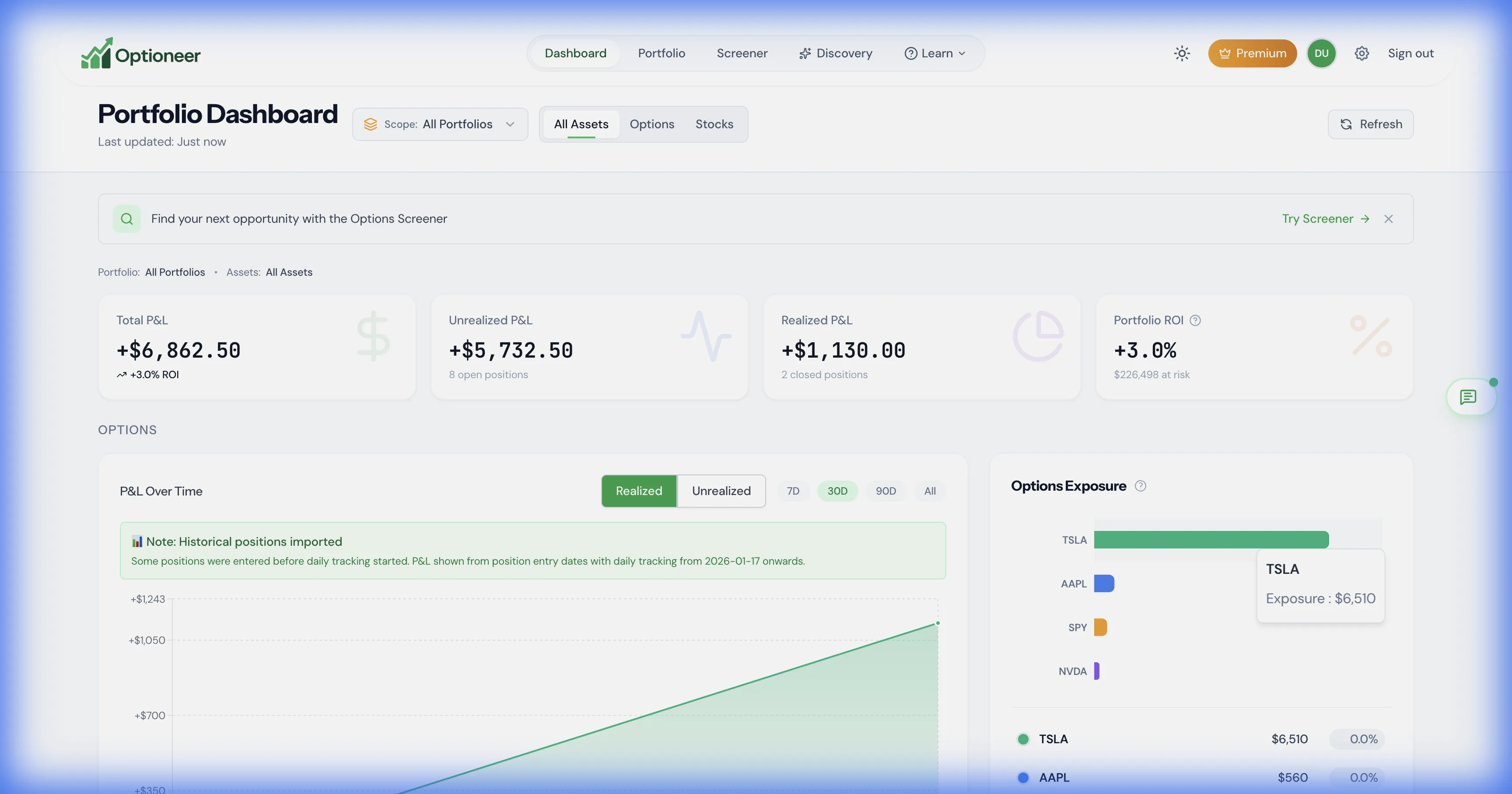
Discovery narrows supported candidates; Scenario Lab then estimates the effect of a hypothetical trade on the selected portfolio. The captures below show the safe demo inputs and portfolio baseline, not a promised outcome.
Optioneer Discovery demo results with filtered option candidates
Discovery result: filtered candidates can be reviewed before moving an idea into a hypothetical scenario. Illustrative demo data.
Optioneer demo portfolio dashboard showing the portfolio context for scenario analysis
Selected-portfolio baseline: Scenario Lab estimates changes to cash, concentration, and available Greeks without modifying real positions. Illustrative demo data.

Product strengths

Where the products differ

Option Samurai combines market-wide options scanning with trade analysis, a journal, live position monitoring, and a supported broker handoff.

Where Option Samurai stands out

  • Option Samurai provides the larger specialist filter library for market-wide options scans.
  • Its scanner-to-journal workflow, live monitoring, and documented Tradier or Thinkorswim handoff continue beyond the initial scan.

Pricing comparison

Compare the subscription and what it is for

Prices are snapshots from the linked official pricing pages. Taxes, promotions, market-data rules, app-store pricing, and plan details can change.

Optioneer Premium

US$19/month or US$150/year

  • Monthly plan: US$19, billed monthly
  • Annual plan: US$150, paid annually (US$12.50/month equivalent)
  • 7-day Premium trial; payment card required
  • Broker Sync is not available during the trial and requires active paid Premium
View Optioneer pricing

Option Samurai

Beginner from US$39/month; Advanced from US$59/month

  • Beginner starts at US$39 per month
  • Advanced starts at US$59 per month
  • A 14-day full trial without a payment card is advertised
  • The reviewed official pricing documentation did not expose exact annual totals
View official Option Samurai pricing

Monthly-to-monthly, Optioneer Premium is US$19 and Option Samurai plans start at US$39. Annual totals are not compared because the reviewed official Option Samurai source did not expose them.

Frequently asked questions

Questions about Optioneer and Option Samurai

Is Optioneer Discovery as deep as Option Samurai scanning?+

No. Option Samurai advertises a larger specialist scan universe and more than 100 filters. Optioneer Discovery uses a more focused set of supported strategy and contract filters, then connects the result to Scenario Lab and the tracked portfolio.

Can I save scans in both products?+

Yes. Option Samurai supports saved and reusable scans. Optioneer Premium supports up to 50 Saved Screens that can be renamed, duplicated, updated, rerun, and compared.

Does order preparation submit a trade?+

No automatic submission is implied. Option Samurai documents a handoff for Tradier and Thinkorswim that requires confirmation. Optioneer supports manual instructions or BasketTrader CSV only for eligible single-leg IBKR scenarios; you must review and transmit the order in TWS.

What can I test during the Optioneer trial?+

The 7-day Premium trial includes manual and supported CSV setup, Discovery, Saved Screens, Scenario Lab, and portfolio analytics. A payment card is required. Broker Sync is not available during the trial.

How do I bring positions into Optioneer?+

Enter them manually, import supported CSV activity, or use eligible read-only Broker Sync after the trial with active paid Premium. Optioneer does not claim a direct Option Samurai journal migration.

Official competitor sources

We use first-party product and pricing pages and date the review so claims can be rechecked.

Competitor information last checked:

Try the Optioneer workflow

Take a candidate all the way into portfolio context

Run a screen, test the hypothetical impact, track the position, and learn from the recorded outcome.

Back to all comparisons