Optioneer comparison

Optioneer vs OptionStrat: portfolio workflow or strategy visualizer?

OptionStrat is strongest when you want to model and optimize an options setup. Optioneer is built to connect the positions you already own with P/L, Greeks, Discovery, Scenario Lab, and position management.

Card required. Broker Sync requires active paid Premium and is not available during the trial. Set up positions with manual or supported CSV import or review the tested IBKR Broker Sync requirements.

Competitor information last checked:

Quick decision

Which product fits your main job?

Start with the outcome you need most. These tools overlap, but they are not organized around the same problem.

Choose Optioneer

Choose Optioneer if your starting point is your real portfolio and you want tracking, portfolio exposure, idea discovery, scenario testing, and roll comparison to stay connected.

Choose OptionStrat

Choose OptionStrat if your main job is visualizing payoffs, exploring strategy templates, optimizing a setup, or following unusual options flow.

Feature comparison

What each tool helps you do

Source icons open the official competitor page supporting each claim.

Primary job

Optioneer

Portfolio workflow

Track positions, exposure, ideas, scenarios, and eligible rolls in one connected workflow.

OptionStrat

Strategy modeling

Visualize, optimize, and track modeled options strategies.

Payoff modeling

Optioneer

Options Calculator + Scenario Lab

Model a payoff, then test a hypothetical trade against an existing portfolio.

OptionStrat

Core strength

Interactive tables and charts update as strikes, time, and volatility change.

Position context

Optioneer

Portfolio P/L and Greeks

Position and portfolio views include P/L and Delta, Gamma, Theta, and Vega when data is available.

OptionStrat

Saved strategy tracking

Saved trades can track realized and unrealized return; paid tools add net and future Greeks.

Finding ideas

Optioneer

Discovery + Saved Screens

Run options strategy scans and save reusable filter sets.

OptionStrat

Optimizer + options flow

Search modeled trades or inspect unusual options transactions.

Ongoing portfolio intake

Optioneer

Manual, CSV, or Broker Sync

Read-only Broker Sync is available for eligible accounts with active paid Premium.

OptionStrat

Saved trades

The official feature page emphasizes saving, sharing, and tracking strategies.

Mobile use

Optioneer

Web, iOS, and Android

Portfolio workflows are available across the web and native mobile apps.

OptionStrat

Web, iOS, and Android

The native iOS and Android apps include the strategy calculator/visualizer, optimizer, and flow tools—not only alerts.

Workflow comparison

Two different starting points for an options decision

The biggest difference is not a checkbox. It is whether the workflow begins with a modeled trade or with the portfolio that trade may join.
1

Optioneer

Find or shape the idea

Use Discovery and Saved Screens, or build a payoff in the Options Calculator.

OptionStrat

Find or shape the idea

Use the visualizer, more than 50 templates, the optimizer, or options flow.

2

Optioneer

Test the risk

Use Scenario Lab to estimate how the hypothetical trade changes portfolio cash, concentration, and Greeks.

OptionStrat

Test the risk

Adjust strikes, time, and implied volatility in the strategy builder to inspect the modeled payoff.

3

Optioneer

Follow the outcome

Record or sync the position, follow portfolio P/L and Greeks, then use Your Edge and Roll Assistant where applicable.

OptionStrat

Follow the outcome

Save the modeled trade to track total, daily, realized, and unrealized return.

Optioneer product example

See the portfolio baseline behind an Optioneer scenario

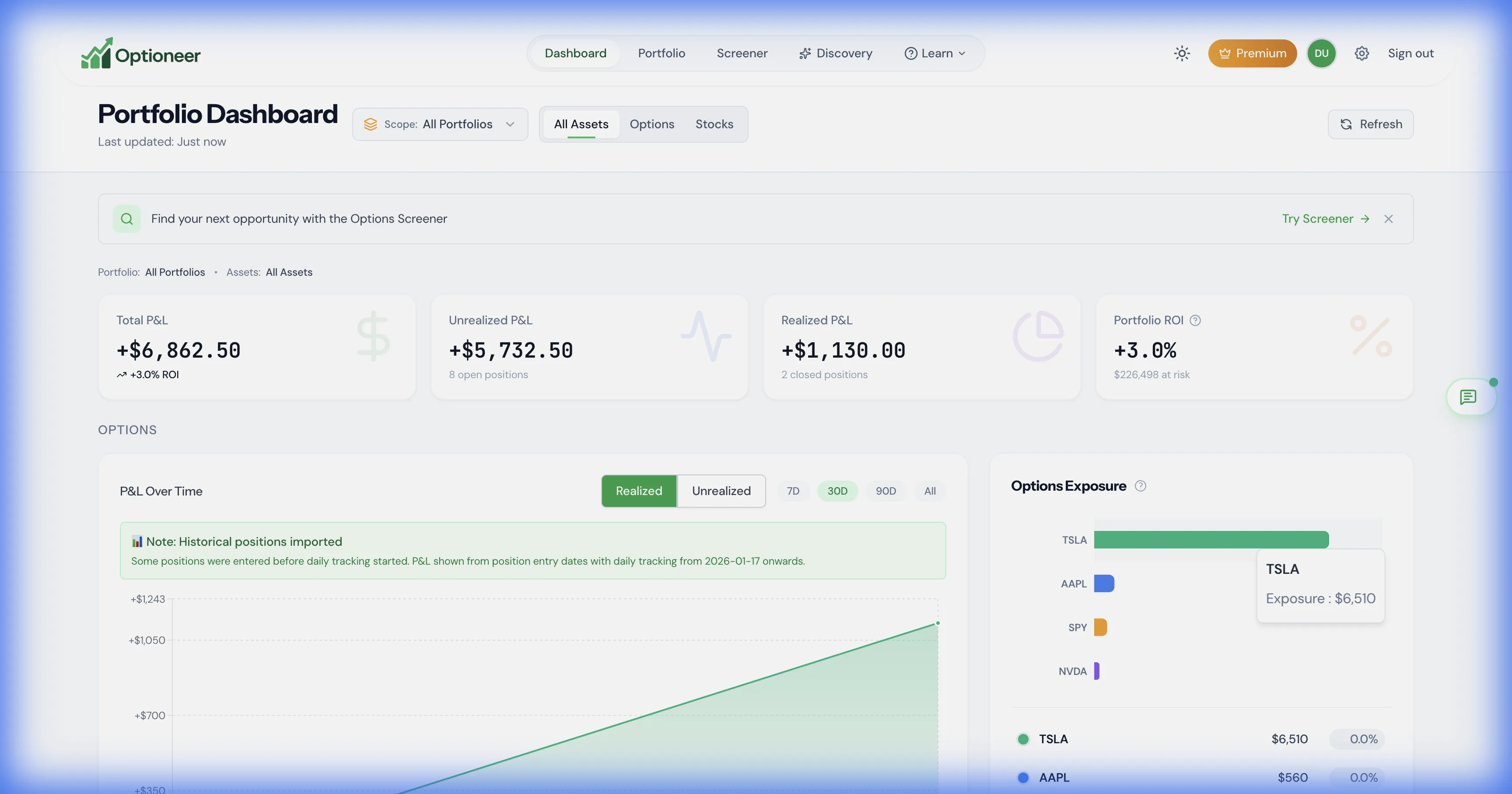
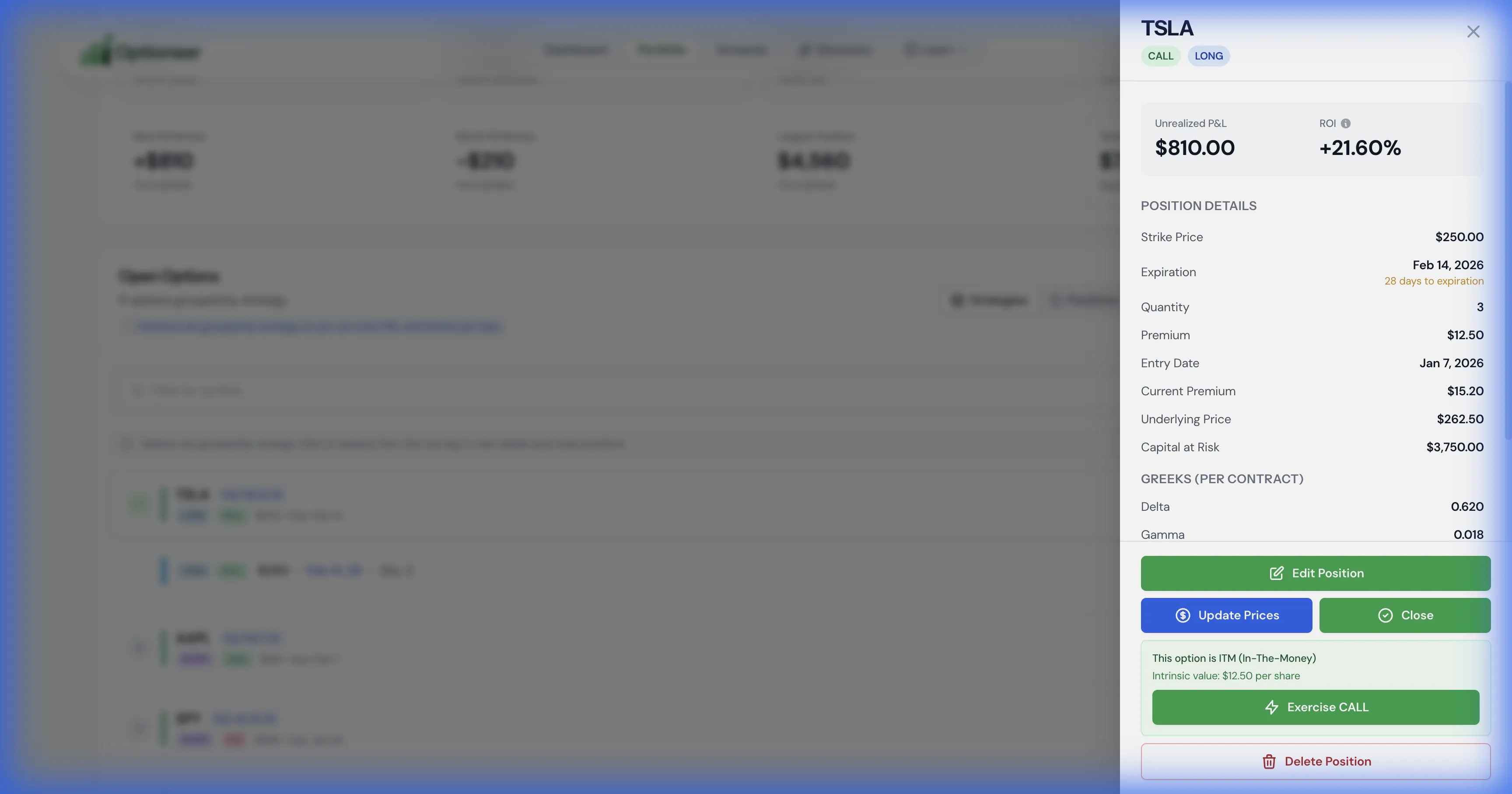
Scenario Lab starts from the portfolio you select. These safe demo captures show the tracked exposure and position-level Greeks that provide that context; values are illustrative, not performance claims.
Optioneer demo portfolio dashboard with options exposure and profit and loss panels
Portfolio baseline: current positions, exposure, and P/L are visible before a hypothetical scenario is evaluated. Illustrative demo data.
Optioneer demo position detail panel showing position Greeks and management controls
Position detail: available Delta, Gamma, Theta, and Vega estimates stay tied to the recorded position. Illustrative demo data.

Product strengths

Where the products differ

OptionStrat centers on visual strategy modeling, an options optimizer, saved trade tracking, and unusual options flow.

Where OptionStrat stands out

  • OptionStrat provides a particularly direct, interactive way to shape a multi-leg payoff and see the modeled result change.
  • Its dedicated options optimizer and unusual-flow tooling go deeper than Optioneer in those specific jobs.

Pricing comparison

Compare the subscription and what it is for

Prices are snapshots from the linked official pricing pages. Taxes, promotions, market-data rules, app-store pricing, and plan details can change.

Optioneer Premium

US$19/month or US$150/year

  • Monthly plan: US$19, billed monthly
  • Annual plan: US$150, paid annually (US$12.50/month equivalent)
  • 7-day Premium trial; payment card required
  • Broker Sync is not available during the trial and requires active paid Premium
View Optioneer pricing

OptionStrat

Free; Live Tools US$39.99/month; Live Flow US$99.99/month

  • Free tier includes delayed data and limited feature access
  • Live Tools: US$39.99 on the monthly billing view
  • Live Flow: US$99.99 on the monthly billing view
  • An annual option advertises 12% savings; the reviewed page did not expose an exact annual total
View official OptionStrat pricing

Monthly-to-monthly, Optioneer Premium is US$19 and OptionStrat Live Tools is US$39.99. Annual Optioneer pricing is shown separately because the reviewed OptionStrat page did not expose an exact annual total.

Frequently asked questions

Questions about Optioneer and OptionStrat

What can I test during the Optioneer trial?+

The 7-day Premium trial includes manual and supported CSV portfolio setup, Discovery, Saved Screens, portfolio analytics, Scenario Lab, and other Premium tools. A payment card is required. Broker Sync is not available until the subscription becomes active paid Premium.

Is Optioneer an OptionStrat replacement?+

Not for every use case. OptionStrat centers visual strategy modeling, optimization, and options flow. Optioneer instead connects modeled ideas to a tracked portfolio, Scenario Lab, Your Edge, and ongoing position workflows.

Do both products calculate options payoffs?+

Yes, with different emphasis. OptionStrat makes interactive strategy visualization a central product experience. Optioneer offers a public Options Calculator and adds portfolio-aware hypothetical testing in Scenario Lab.

How do the mobile products compare?+

Both products have iOS and Android apps. OptionStrat documents calculator/visualizer, optimizer, and flow functionality in its mobile app. Optioneer extends its tracked portfolio workflow to native mobile; feature availability can still differ by platform.

How do I bring positions into Optioneer?+

Enter them manually, import supported CSV activity, or use eligible read-only Broker Sync after the trial with active paid Premium. IBKR is the currently tested brokerage. This page does not promise direct migration from OptionStrat saved trades.

Which product is better for unusual options flow?+

OptionStrat. Its official feature and membership pages describe dedicated options-flow feeds, filters, alerts, and performance tracking. Optioneer Discovery is a strategy screener, not a live unusual-flow feed.

Official competitor sources

We use first-party product and pricing pages and date the review so claims can be rechecked.

Competitor information last checked:

Try the Optioneer workflow

See the portfolio side of the decision

Try the workflow that connects positions, P/L, Greeks, Discovery, Scenario Lab, Your Edge, and eligible rolls.

Back to all comparisons