Optioneer comparison

Optioneer vs WingmanTracker: how much workflow do you need?

Both products take options tracking seriously. WingmanTracker concentrates on importing, grouping, monitoring, and reviewing trades. Optioneer extends from tracking into Discovery, portfolio Greeks, Scenario Lab, Your Edge, and Roll Assistant.

Card required. Broker Sync requires active paid Premium and is not available during the trial. Set up positions with manual or supported CSV import or review the tested IBKR Broker Sync requirements.

Competitor information last checked:

Quick decision

Which product fits your main job?

Start with the outcome you need most. These tools overlap, but they are not organized around the same problem.

Choose Optioneer

Choose Optioneer if you want options tracking connected to market screening, portfolio-aware scenario testing, portfolio Greeks, and a native Wheel lifecycle.

Choose WingmanTracker

Choose WingmanTracker if automatic strategy grouping from broker CSVs, roll continuity, P/L target alerts, notes, and journal reports are your priorities.

Feature comparison

What each tool helps you do

Source icons open the official competitor page supporting each claim.

Primary job

Optioneer

Portfolio decision system

Connect tracking with exposure, Discovery, scenarios, and eligible roll comparison.

WingmanTracker

Automated options journal

Import and group options activity, including rolls and adjustments.

Trade intake

Optioneer

Manual, CSV, or Broker Sync

Broker Sync is read-only and requires eligible active paid Premium.

WingmanTracker

Broker CSV imports

Export transactions from a supported broker, then upload them to WingmanTracker.

Completed roll history

Optioneer

Recorded position activity

History reflects transactions that were entered or imported. Optioneer does not automatically infer and group every earlier roll.

WingmanTracker

Automatic roll grouping

Imported rolls and adjustments can remain grouped with the existing position.

Potential replacement contracts

Optioneer

Roll Assistant

Compare eligible current-chain contracts, then open a candidate in Scenario Lab. It does not recommend or execute a roll.

WingmanTracker

Different job

WingmanTracker documents completed-roll grouping and alerts; that is separate from comparing current replacement contracts.

Performance review

Optioneer

Portfolio P/L + Your Edge

Review portfolio performance and realized results by strategy and underlying.

WingmanTracker

Reports and custom tags

Review metrics across accounts and group performance by strategy, underlying, or custom tags.

Risk view

Optioneer

Portfolio Greeks

View Delta, Gamma, Theta, and Vega at position and portfolio level when data supports them.

WingmanTracker

Risk profile tools

WingmanTracker lists a profit calculator, risk profile visualization, and premium/volatility history.

Pre-trade workflow

Optioneer

Discovery + Scenario Lab

Find candidates with Saved Screens and test portfolio impact before recording a trade.

WingmanTracker

Tracking-led workflow

The official product page emphasizes importing, managing, and reviewing trades.

Workflow comparison

Import-first journaling or an end-to-end decision loop

The products overlap most in tracking and post-trade review. They diverge in how much they cover before a trade and how they represent portfolio exposure.
1

Optioneer

Bring in activity

Add trades manually, import supported CSV activity, or use eligible read-only Broker Sync.

WingmanTracker

Bring in activity

Export a CSV from a supported brokerage and upload transactions for grouping.

2

Optioneer

Manage changes

Use recorded activity for position history. Separately, Roll Assistant compares eligible replacement contracts using current chain data.

WingmanTracker

Manage changes

Keep rolls and adjusted legs grouped with the position and monitor custom profit or loss targets.

3

Optioneer

Review the evidence

Use portfolio P/L, Greeks, and Your Edge to review exposure and realized outcomes by strategy and underlying.

WingmanTracker

Review the evidence

Use reports, filters, and custom tags to analyze strategy, underlying, and setup performance.

Optioneer product example

See position history separately from a future roll decision

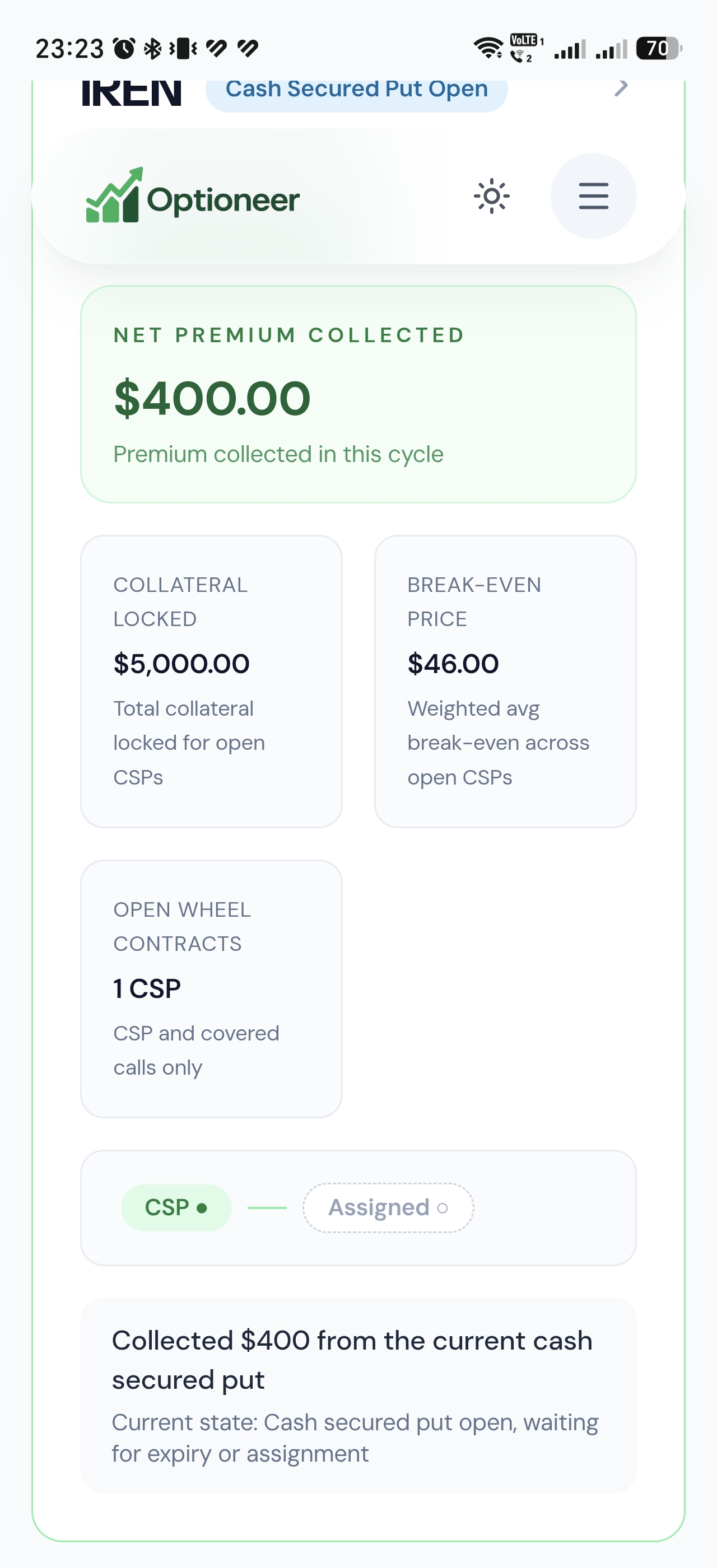
Optioneer keeps recorded position activity and the Wheel lifecycle visible. Roll Assistant is a separate current-chain comparison for eligible positions; it is not automatic historical roll grouping.
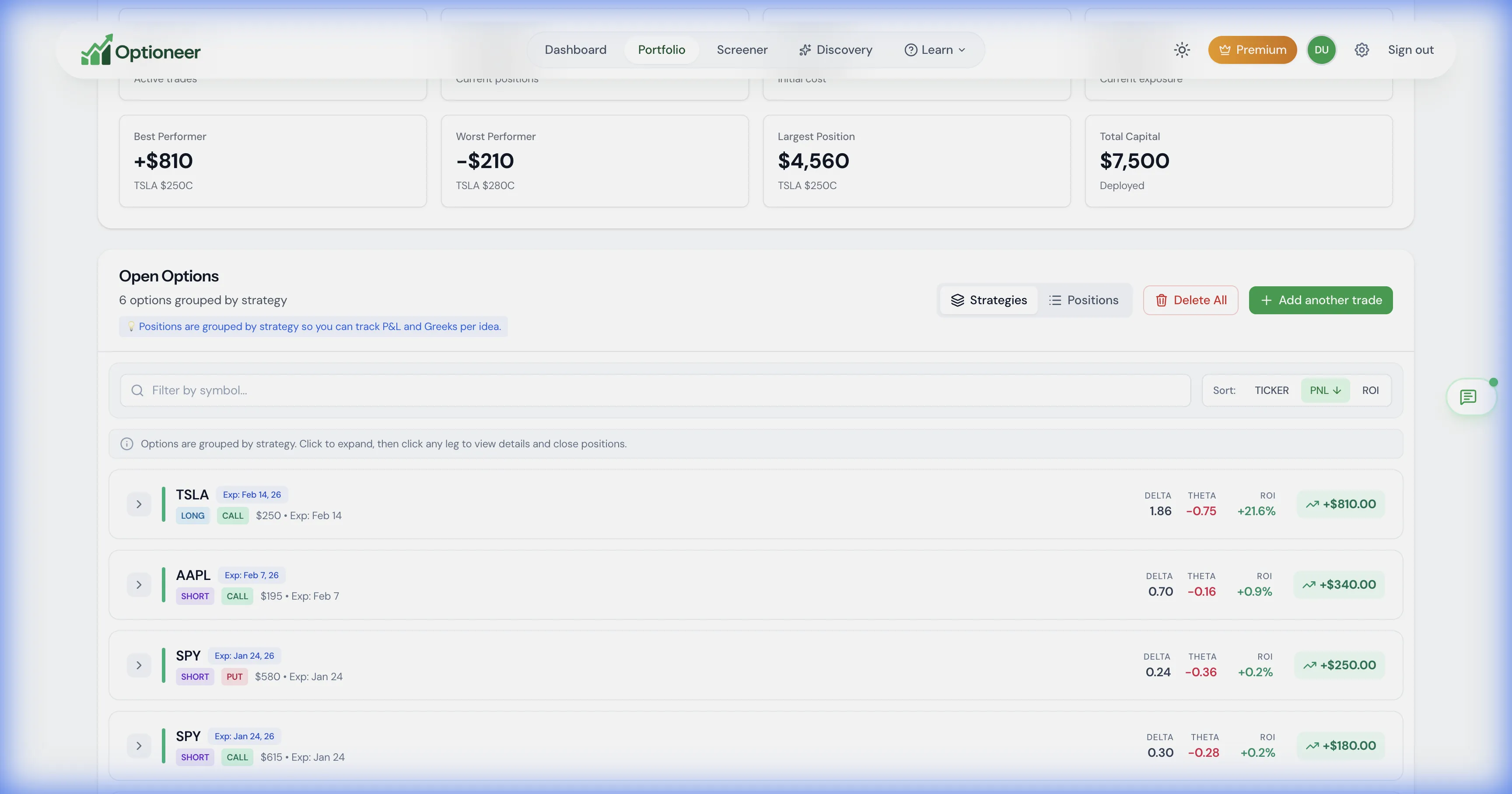
Optioneer demo portfolio list with grouped open options positions
Tracked positions are grouped from recorded or imported activity; historical completeness depends on the transactions available. Illustrative demo data.
Optioneer Wheel Tracker demo showing a position lifecycle and activity
Wheel Tracker shows the recorded lifecycle. Roll Assistant compares potential replacement contracts in a separate step. Illustrative demo data.

Product strengths

Where the products differ

WingmanTracker is an automated options tracker and trading journal focused on grouping imported trades, tracking rolls, setting P/L targets, and analyzing results.

Where WingmanTracker stands out

  • WingmanTracker is especially explicit about automatic grouping, roll continuity, and importing brokerage CSVs into an options journal.
  • Its built-in P/L target alerts and flexible custom tagging are useful for traders whose process centers on journal discipline.

Pricing comparison

Compare the subscription and what it is for

Prices are snapshots from the linked official pricing pages. Taxes, promotions, market-data rules, app-store pricing, and plan details can change.

Optioneer Premium

US$19/month or US$150/year

  • Monthly plan: US$19, billed monthly
  • Annual plan: US$150, paid annually (US$12.50/month equivalent)
  • 7-day Premium trial; payment card required
  • Broker Sync is not available during the trial and requires active paid Premium
View Optioneer pricing

WingmanTracker

US$49/month, billed monthly

  • One Premium plan is listed
  • 30-day trial is advertised
  • Unlimited trades, strategy grouping, and trading accounts are listed
View official WingmanTracker pricing

Monthly-to-monthly, Optioneer Premium is US$19 and WingmanTracker is US$49. WingmanTracker advertises a longer trial; no annual WingmanTracker price is used in this comparison.

Frequently asked questions

Questions about Optioneer and WingmanTracker

Do Optioneer and WingmanTracker both track rolls?+

They cover different parts of the job. WingmanTracker emphasizes automatically grouping imported completed rolls with a position. Optioneer history depends on recorded or imported transactions; its separate Roll Assistant compares eligible potential replacement contracts and does not recommend or execute a roll.

Which product is better for the Wheel strategy?+

Optioneer has a dedicated Wheel Tracker that connects the cash-secured put, assignment, shares, covered calls, and exit. WingmanTracker states that it tracks covered calls, rolls, adjustments, and complex strategies, which may suit traders who prefer a journal-led view.

How do I bring positions into Optioneer?+

You can enter positions manually, import supported CSV activity, or use eligible read-only Broker Sync after the trial with active paid Premium. This page does not promise direct migration from a WingmanTracker export.

What can I test during the Optioneer trial?+

The 7-day Premium trial includes manual and supported CSV setup, portfolio analytics, Discovery, Scenario Lab, Wheel Tracker, and Roll Assistant where the position is eligible. A card is required. Broker Sync is not available during the trial.

Official competitor sources

We use first-party product and pricing pages and date the review so claims can be rechecked.

Competitor information last checked:

Try the Optioneer workflow

Try the broader options portfolio loop

Track positions, inspect exposure, find candidates, test portfolio impact, and compare eligible rolls from one workflow.

Back to all comparisons