Optioneer comparison

Optioneer vs OptionNet Explorer: portfolio workflow or backtesting?

OptionNet Explorer specializes in desktop strategy design, historical options backtesting, and broker-connected monitoring. Optioneer focuses on current portfolio tracking, scenarios, research, and management across web and mobile.

Card required. Broker Sync requires active paid Premium and is not available during the trial. Set up positions with manual or supported CSV import or review the tested IBKR Broker Sync requirements.

Competitor information last checked:

Quick decision

Which product fits your main job?

Start with the outcome you need most. These tools overlap, but they are not organized around the same problem.

Choose Optioneer

Choose Optioneer if your daily workflow centers on current positions, portfolio P/L and Greeks, Discovery, Scenario Lab, Your Edge, and mobile access.

Choose OptionNet Explorer

Choose OptionNet Explorer if historical intraday options backtesting, strategy design, and desktop monitoring with supported broker data are the main requirements.

Feature comparison

What each tool helps you do

Source icons open the official competitor page supporting each claim.

Primary job

Optioneer

Current portfolio workflow

Track current positions, portfolio exposure, scenarios, discovery, performance evidence, and eligible roll choices.

OptionNet Explorer

Strategy design and backtesting

Design, backtest, analyze, and monitor complex options strategies in one desktop environment.

Historical backtesting

Optioneer

Not offered

Scenario Lab estimates hypothetical portfolio impact; it is not a historical options backtesting engine.

OptionNet Explorer

Core strength

Backtest historical trades and strategies using the historical data included with the subscription.

Historical data detail

Optioneer

Current-workflow emphasis

Available market data supports current analytics, screening, hypothetical scenarios, and roll comparison.

OptionNet Explorer

Five-minute historical intervals

The official pages list historical market data for optionable US equities and indexes in five-minute intervals.

Platform

Optioneer

Web, iOS, and Android

Use the portfolio workflow across supported browsers and Optioneer mobile apps.

OptionNet Explorer

Windows desktop software

The current system requirements list Windows 10 or 11 and describe limited Parallels compatibility on Mac ARM.

Live position monitoring

Optioneer

Portfolio tracking and alerts

Track recorded or eligible synced positions, portfolio analytics, and supported alert workflows.

OptionNet Explorer

Broker-data monitoring

Monitor positions in real time when a listed preferred broker provides the live or delayed data feed.

Order submission

Optioneer

Not offered

Optioneer does not submit or execute trades; orders remain a manual broker action.

OptionNet Explorer

Listed broker integrations

The pricing page says orders can be sent to Interactive Brokers and Tradier from the platform.

Workflow comparison

Manage the portfolio you own or test the strategy through history

The products overlap in position analysis, but OptionNet Explorer puts historical testing at the center while Optioneer connects current portfolio decisions.
1

Optioneer

Shape the decision

Use Discovery or the Options Calculator, then test a hypothetical trade against a selected portfolio in Scenario Lab.

OptionNet Explorer

Shape the decision

Create complex stock and options strategies inside the desktop analysis environment.

2

Optioneer

Test the risk

Estimate changes to cash, concentration, payoff, and available portfolio Greeks without modifying real positions.

OptionNet Explorer

Test the risk

Backtest the strategy against included historical options data in five-minute intervals.

3

Optioneer

Follow the position

Track the recorded portfolio, review performance evidence, and compare eligible replacement contracts without submitting an order.

OptionNet Explorer

Follow the position

Monitor positions with supported broker data and, for listed integrations, send an order from the platform.

Optioneer product example

See the current-portfolio side of the decision

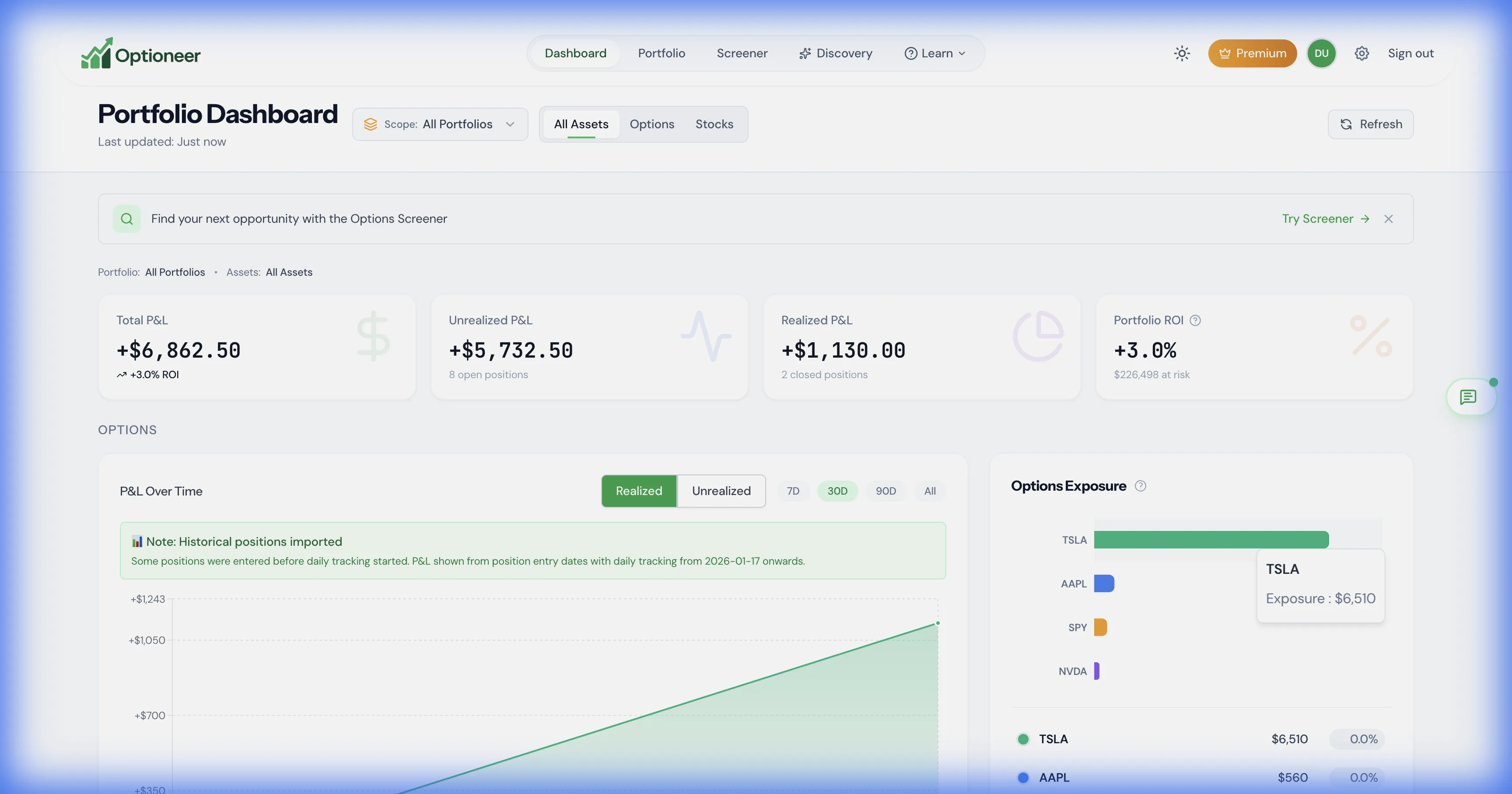
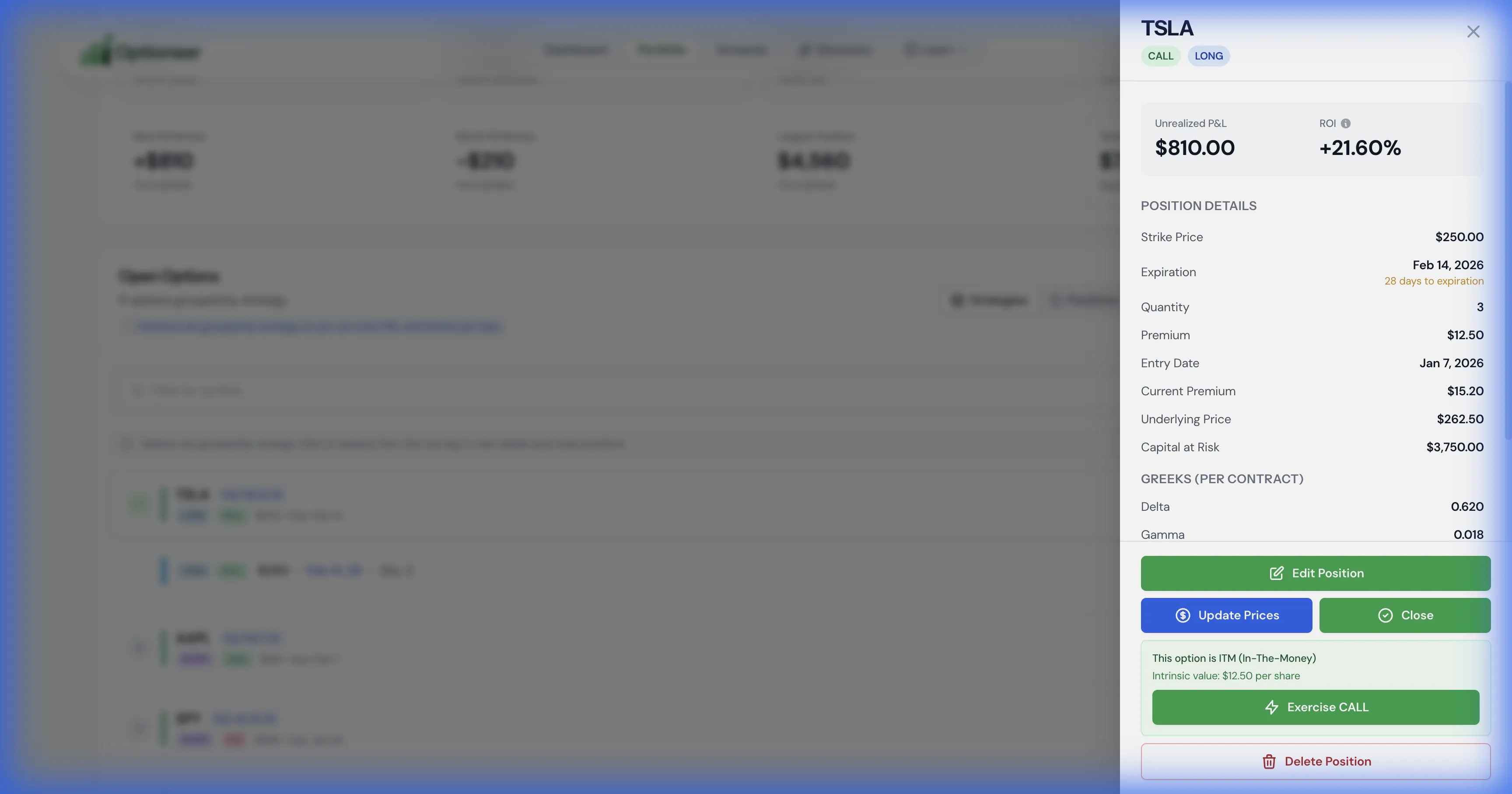
These safe demo captures show the separate Optioneer job: following current portfolio exposure and the position context used for ongoing decisions.
Optioneer demo dashboard showing current portfolio positions and exposure
Current portfolio context includes recorded positions, P/L, and available risk measures. Illustrative demo data.
Optioneer demo position details with current profit and loss and Greek estimates
Position-level context supports current management decisions; it is not historical options backtesting. Illustrative demo data.

Product strengths

Where the products differ

OptionNet Explorer is a Windows options analysis platform for designing and backtesting complex strategies, analyzing results, and monitoring positions in real time.

Where OptionNet Explorer stands out

  • OptionNet Explorer provides historical intraday options backtesting, which Optioneer does not offer.
  • Its desktop environment combines strategy design, historical testing, live broker-data monitoring, and listed order-routing integrations.

Pricing comparison

Compare the subscription and what it is for

Prices are snapshots from the linked official pricing pages. Taxes, promotions, market-data rules, app-store pricing, and plan details can change.

Optioneer Premium

US$19/month or US$150/year

  • Monthly plan: US$19, billed monthly
  • Annual plan: US$150, paid annually (US$12.50/month equivalent)
  • 7-day Premium trial; payment card required
  • Broker Sync is not available during the trial and requires active paid Premium
View Optioneer pricing

OptionNet Explorer

GBP 10 trial; GBP 165 for 3 months or GBP 535 for 12 months

  • The fully functional trial lasts 10 days and is limited to one per customer
  • Listed subscription prices exclude VAT
  • Historical data and software upgrades are included during the subscription term
View official OptionNet Explorer pricing

OptionNet Explorer charges for a specialist desktop backtesting and monitoring platform. Optioneer is priced for a web-and-mobile portfolio workflow and does not offer historical options backtesting or order submission.

Frequently asked questions

Questions about Optioneer and OptionNet Explorer

Does Optioneer replace OptionNet Explorer backtesting?+

No. Optioneer Scenario Lab estimates how a hypothetical trade could change a selected current portfolio. It is not a historical options backtesting engine. OptionNet Explorer is the better fit when historical strategy testing is essential.

What does the OptionNet Explorer trial currently cost?+

Its official pricing page lists a fully functional 10-day trial at GBP 10, limited to one per customer. Prices are quoted excluding VAT and can change, so use the linked official page before purchasing.

Can I use OptionNet Explorer on a Mac?+

The official requirements list Windows 10 or 11 and also describe limited Parallels compatibility on Mac ARM processors. Check the current requirements and the exact Mac configuration with OptionNet Explorer before buying.

Does Optioneer send orders to a broker?+

No. Optioneer can help analyze, track, and prepare a decision, but it does not submit or execute trades. OptionNet Explorer lists order submission for specific supported brokers.

Official competitor sources

We use first-party product and pricing pages and date the review so claims can be rechecked.

Competitor information last checked:

Try the Optioneer workflow

Bring the focus back to your current portfolio

Track positions, inspect exposure, test hypothetical portfolio impact, and manage recurring options workflows across web and mobile.

Back to all comparisons