What rolling changes
Rolling closes the option you have and opens another option, often with a different expiration, strike, or both. A short option is bought back and another is sold; a long option is sold and another is bought.
You might compare rolls to add more time, move the strike, inspect money received or paid, or change exposure. Rolling does not erase a loss or repair a trade automatically. The new option has its own remaining risk.
Start from an existing option position
Open your position in the Portfolio page and choose Explore Roll to open Roll Assistant where it is available. It starts with that option’s ticker, call or put, long or short direction, and existing quantity.
Supported positions include eligible short puts, covered or short calls, long calls, and long puts. A supported short-call cycle in a poor man’s covered call can be compared without changing its long anchor.
Grouped spreads and the PMCC anchor cannot be rolled through this workflow. Missing or adjusted contract terms may make some estimates unavailable; Optioneer does not invent a 100-share deliverable.
Read your current position
Illustrative example · one standard short put
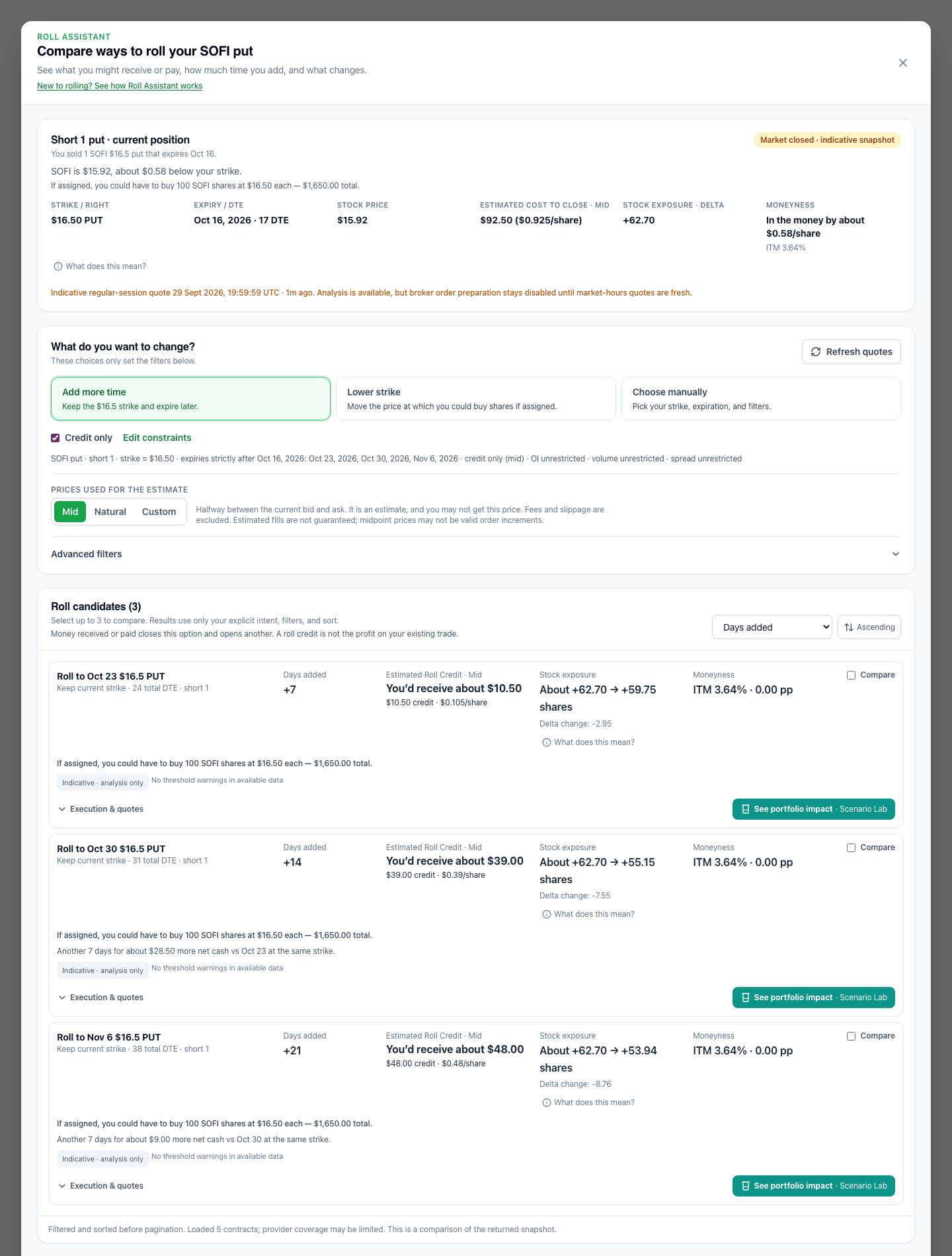
You sold one SOFI $16.50 put expiring Oct 16. With SOFI at $15.75, the stock is $0.75 below your strike. If assigned, you could have to buy 100 shares at $16.50 each — $1,650 total.
- Strike and expiration / DTE
- The strike is the option’s exercise price. Expiration is its end date; DTE means days to expiration.
- Stock price and ITM / OTM
- A put is in the money when the stock is below the strike; a call is in the money when it is above. ITM does not by itself mean a losing trade or certain assignment. OTM does not mean safe.
- Current option price
- This is the option’s price per share, not your total P/L. Closing a short option costs money to buy it back; closing a long option receives money from selling it. Transaction totals use quantity and validated contract multipliers.
- Assignment or exercise
- A short put can require buying shares; a short call can require delivering shares. A long call gives the right to buy, and a long put the right to sell. Covered calls can deliver shares you own; an uncovered call may need shares you do not own.
Choose what to change
- Add more time
- Keep the current strike and compare the first available later expirations. The active constraints show which dates are included.
- Lower the strike / Raise the strike
- For a short put, compare a lower purchase price if assigned. For a short call, compare a higher sale price if assigned. Long-option strike choices use neutral wording because exercise rights differ.
- Credit only
- Show alternatives with positive estimated roll cash flow under the selected price assumption. This changes neither your strike/date settings nor the liquidity filters, and it does not select profitable trades.
- Choose manually
- Set your own strike range, expiration range, and filters. Advanced filters let you narrow Delta, moneyness, open interest, volume, and bid/ask spread without forcing those controls into your first comparison.
Open interest counts outstanding contracts; volume counts contracts traded in the session. A wide bid/ask spread means a larger gap between quoted selling and buying prices. These describe liquidity, not whether a trade is right for you.
If nothing matches, inspect the stated constraints and quote warnings. Change them deliberately; an empty result is not a reason to assume the search covered every available contract.
Choose a price assumption
- Mid
- Halfway between each option’s bid and ask. It is an estimate, and you may not get that price.
- Natural
- Uses the ask for purchases and the bid for sales. This is a more conservative estimate at the quoted sides; those quotes still do not guarantee a fill.
- Custom
- Enter the prices you think you could actually get for closing the existing option and opening the new one.
For a short option, roll cash flow is the new option’s sale proceeds minus the cost to buy back the existing option. For a long option, it is existing-option sale proceeds minus the new option’s purchase cost. Positive means money received; negative means money paid. Fees and slippage are excluded.
Compare the alternatives
Read the new expiration and strike first, then days added and the approximate amount you would receive or pay. Check assignment or exercise consequences and the change in stock exposure before inspecting the detailed quotes.
Stock exposure translates signed position Delta into roughly equivalent shares. For example, about +72 shares → +59 shares means a smaller positive sensitivity to a small stock-price move, holding other factors constant. These are not actual shares you own, and lower exposure is not automatically better.
Technical details retain contract Delta and Delta change. Delta is not a guaranteed move or exact assignment probability. All current/new moneyness comparisons use the same stock-price reference; keeping the same strike can leave the moneyness change at 0.00 percentage points.
Review warnings for both the option you close and the one you open. Low or unknown liquidity, wide spreads, stale prices, and a closed market can change whether an estimate is useful or eligible for later order preparation.
A credit is not profit
“Receive $40” describes the transaction, not the result of your existing trade.
Illustrative example: you originally received $60 for a short option. Buying it back now costs $90, and selling the new option receives $130. The roll brings in $40 ($130 − $90), while closing the original option realizes a $30 loss before fees ($60 − $90).
The new option remains open with its own risk. Its $130 premium is not settled profit. Roll Assistant does not reconstruct an original entry premium or realized P/L when reliable entry data is unavailable.
Compare extra time and money
For otherwise comparable same-strike alternatives, look at what another week adds to the estimated cash flow.
Oct 23
7 days added
About $11 received
Oct 30
14 days added
About $40 received
Nov 6
21 days added
About $50 received
In this made-up example, Oct 30 adds another 7 days for about $29 more than Oct 23. Nov 6 adds another 7 days for about $10 more than Oct 30. More time also extends the commitment and can change exposure and liquidity.
This comparison does not recommend a date. Alternatives with different strikes or other terms are not a pure exchange of extra time for extra money.
Keep, close, or roll
Select up to three alternatives and open the comparison. It places three distinct decisions alongside each other.
- Keep current position
- Leave your option unchanged. The new transaction cash flow is $0; its existing value, exposure, and risk do not become zero.
- Close the position
- Buy back a short option or sell a long option without opening another one. The estimated closing cash flow uses the active price assumption and is not realized P/L.
- Roll
- Close the existing option and open the selected new option. You exchange one remaining position for another.
Preview the portfolio impact
If one roll is worth exploring, choose See portfolio impact to open it in Scenario Lab. The handoff includes a hypothetical close of the selected existing option and an open of the new one, with the reviewed quantity and price assumptions.
Scenario Lab offsets that selected source position so the comparison does not simply add another option on top of it. Other holdings remain part of your portfolio baseline. No real position is written.
Compare cash and supported before/after exposure using the Scenario Lab guide. A roll with closing actions or different expirations does not have a single-expiration payoff chart; that limitation does not remove its supported portfolio comparison.
Limits and common questions
Optioneer does not recommend a roll, guarantee a fill, or automatically execute a trade. Quotes can be incomplete, stale, or indicative when the market is closed. More credit is not necessarily better. Check current prices, contract terms, fees, and broker requirements before acting.
Do I have to roll if the option is ITM?
No. ITM is a price relationship, not an instruction. Compare keeping, closing, and rolling with their different remaining risks.
Can a roll remove my original loss?
Closing the existing option settles that leg according to its actual entry and exit. Opening another option does not undo that result.
Why do Mid and Natural show different amounts?
They use different prices for each close and open. A roll can show a credit at Mid and a debit at Natural when spreads are wide.
Why is a number unavailable?
The estimate may need a current quote, reliable Greek, validated multiplier, or supported share deliverable. Unavailable does not mean zero.
Will the assignment amount tell me my margin?
No. It describes the supported contractual purchase or sale amount. Your broker determines margin and buying power.
Does opening Scenario Lab place the roll?
No. It creates a what-if analysis. Optioneer does not transmit orders to a broker.
For option exercise and assignment background, see the Options Industry Council’s exercise FAQ. This guide is product education, not investment advice.